A seal number on paper
A QR-coded seal linked to the trip
Record and scan unique seal references so teams can review duplication and mismatches.
Enterprise cargo security
Combine QR-coded seals, GPS tracking and a defined operating procedure to protect mineral movements from loading to receiving.
For steel, ferroalloy, power-generation and enterprise transport teams.
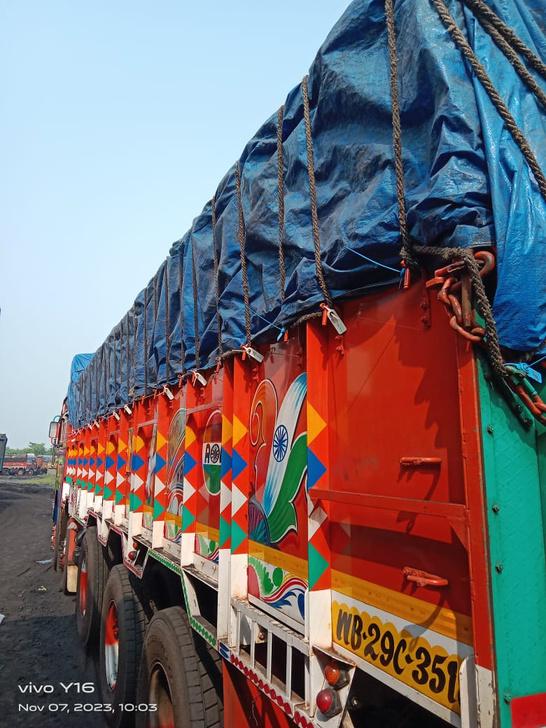
Start with the physical check
Tarpaulin. Fastening.
Seal references.
Seal verification
A unique QR reference for the trip.
Scan at source. Compare at receipt.
GPS visibility
Keep the movement in view.
Location, playback and exceptions.
Geofence checks, QR scans and dispatch evidence.
GPS visibility, route playback and exception alerts.
Compare seals, inspect the truck and report discrepancies.
Close the gaps
Paper references, manual follow-ups and inconsistent checks make a mineral trip harder to review. Connect the evidence each team needs at the next handoff.
Record and scan unique seal references so teams can review duplication and mismatches.
Use location updates, movement history and alerts to guide operational follow-up.
Compare the arriving seals with the dispatch record before completing the receiving handoff.
Standard operating procedure
Follow a clear procedure at the loading point, during transit and at the destination. Give every seal check and exception an accountable next step.
A seal check supports the transport-security review. Weighbridge records, sampling and material acceptance remain part of the plant's receiving procedure.
Assign GPS and seals at the designated loading location. Geofence controls restrict seal scanning outside the source area.
Source location + trip assignment
Check the covering, fasten the tarpaulin bolts with seals, and upload images of the driver and goods before dispatch.
Seal references + inspection images
Technicians follow the installation SOP and report suspicious conditions to the responsible team before departure.
Dispatch check + escalation
Operations teams review GPS updates, route playback and alerts, contact the driver when needed, and report exceptions to the client.
Journey context + response record
Inspect the tarpaulin and truck, compare arriving tag seals with the uploaded references, and report mismatches to operations and plant teams.
Destination check + trip closure
Fleetzz alerts
Bring journey milestones, unusual movement and seal discrepancies to the teams responsible for the trip.
Keep the dispatch and receiving teams informed.
Identify the journeys that need a closer look.
Bring discrepancies into the operational review.
Agree notification settings and recipients for your lane. An alert starts an operational review; the team records the follow-up and receiving action.
The platform and the people
Bring field checks, journey visibility and reporting into the web and mobile workflow. Keep dispatch, operations and plant receiving working from shared references.
One place for the trip record
Review trip status, driver and transporter details, seal records and the unloading handoff.
From installation to receiving
Support field teams with trip updates, seal verification and driver and transporter information.
Records for operations and MIS
Review vehicle and seal information, turnaround time and compiled trip summaries.
Updates across the handoffs
Send trip-start and trip-end email updates, and flag seal mismatches during uninstallation.
Support scope agreed for your lanes
Connect customer support and operational analysis with the teams following your mineral movements.
Questions before rollout
Start with the truck body, the loading location and the plant's receiving procedure. Define the workflow for the lane you actually operate.
Fleetzz combines QR-coded seal verification with GPS tracking and an operating procedure for dispatch, transit monitoring and destination checks. Seal references and inspection evidence are linked to the trip, so receiving teams can compare the arriving seals with the source record.
The source workflow places GPS installation and seal scanning within the designated loading geofence. Scanning outside that geofence is restricted. Source and destination locations are defined when the operating lane is configured.
Technicians inspect tarpaulin integrity and fastening, assign and scan the seals, and upload the required driver and goods images. Suspicious conditions are reported to the responsible team before the truck is released.
The destination team compares the arriving seals with the uploaded dispatch references and physically checks the tarpaulin and truck. Mismatches are flagged during uninstallation and reported to operations and the plant team for investigation and material validation.
The workflow includes journey start and completion updates, extended stoppage, prolonged idle, suspicious location, path deviation, device-tampering and mismatched-seal alerts, plus automated email notifications. Reports cover vehicle and seal details, turnaround time and trip summaries. Relevant settings and recipients are agreed during deployment.
Start with the loading site, receiving plant, vehicle bodies, transporter arrangements and existing security procedure. Agree geofences, seal placement, installation and receiving responsibilities, notification recipients and customer/MIS support coverage before rollout. Weighbridge, sampling and material-acceptance checks remain part of the plant's receiving process.
Start with one operating lane
Share the loading point, receiving plant, truck types and current sealing process. Review GPS, QR-seal verification and operational support for your deployment.